NeatHub Product Overview
NeatHub is an AI-powered, cross-platform smart item management system: one photo lets you enter many items at once, a single sentence finds what you need, and your home, warehouse, or studio can be drawn as a visible layout map. This is not a step-by-step manual but a capability map, so you can decide which features fit your scenario.
✅ Batch entry of many items from one AI photo ✅ Semantic search / search by image ✅ Visual management with Space Plan floor plans
✅ NFC / QR code labels — scan to open the matching content ✅ Phone app and web version, all synced to the cloud
✅ Shared collaborative management ✅ Highly customizable attribute system ✅ Expiry / stock reminders ✅ Statistical reports and Excel export
What is NeatHub
“Too much stuff, can't find it”, “tidied up, and a while later it's a mess again”, “no idea where I put the seasonal things” — NeatHub addresses these around three things: fast entry → accurate retrieval → ongoing management, and already serves more than 50,000 users.
- Use it everywhere: a mobile app plus a web version (receptacle-web.maozla.com), on phone, tablet, or computer
- Cloud sync: data lives in the cloud and syncs in real time across devices, so family members see each other's changes immediately
- Shared collaboration: invite family or teammates to manage the same space together, with permissions you can break down in detail
- Your data travels with you: batch import and export via Excel / CSV, so your data is never locked in
Highlight features
There are many features, but only one backbone: fast entry → accurate retrieval → ongoing management. They are grouped below in those three steps, and each one links to its detailed help document.
📥 Step 1: fast entry
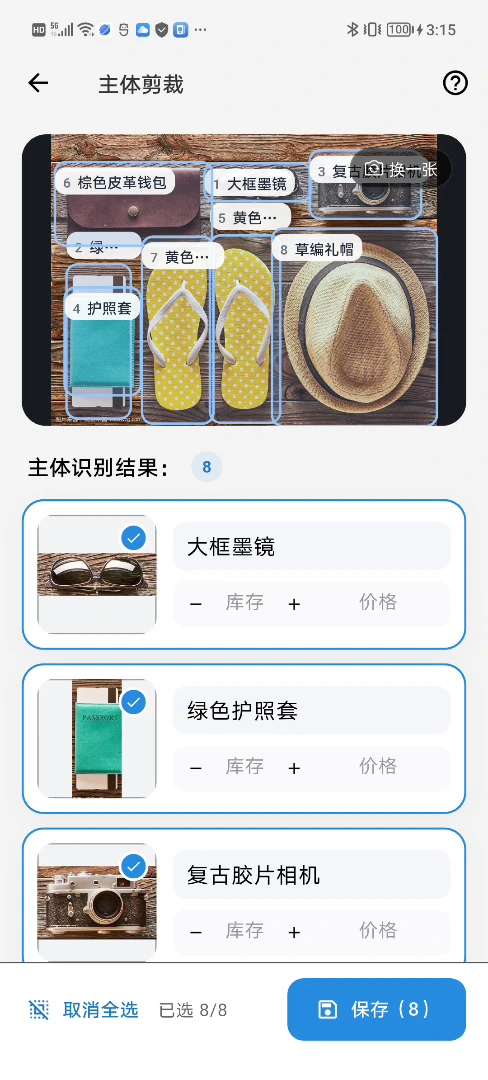
📸 Batch entry from one AI photo
- Photograph a whole cupboard once: multiple items are split automatically into their own entries, and complex scenes can handle 50+ subjects
- Build records in bulk during seasonal sorting or moving, instead of entering one by one by hand
- Stream Add · Multi-object Cropping
🤖 AI recognition & scan entry
- Take a photo and the item's name, category, and attributes are recognized automatically
- Barcode / ISBN and receipt scanning for fast entry; NFC / QR codes open content you have already shared
- AI Item Recognition · Barcode Scanning · Receipt Recognition
🔍 Step 2: accurate retrieval
🔎 Semantic search / search by image
- Once the search index is built, type natural language such as “my winter down jacket” and find it — no need to remember which cupboard it is in
- Take a photo to find the same kind of item, even when you can't recall its name
- Semantic Search · Image Search
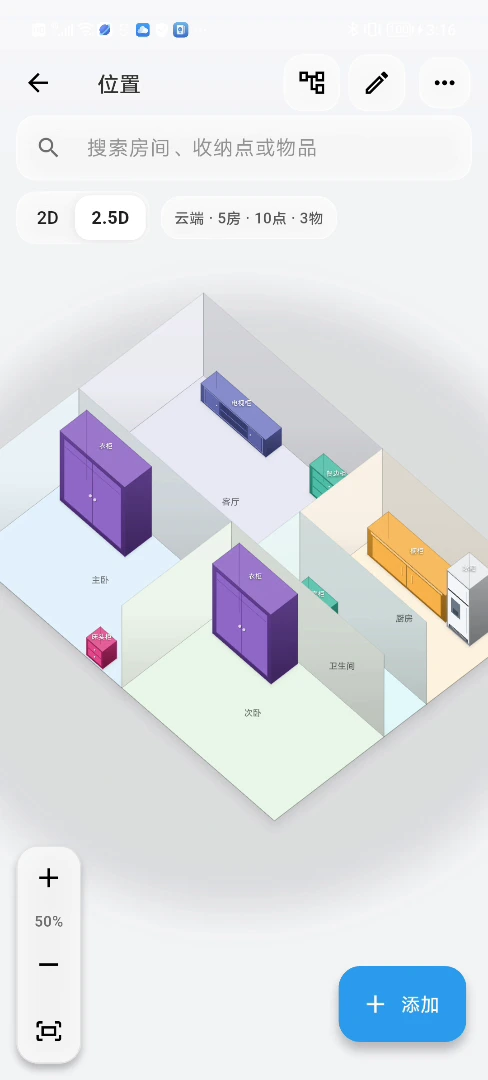
🗺️ Space Plan
- Draw your home as a floor plan, with three levels: room → storage point → item
- In the 2.5D view, one look tells you which cupboard and which shelf something is on
- Full details →
🏷️ NFC / QR code labels
- Put a QR code or NFC tag on a storage box; scan or tap to open the matching content
- No reprinting when the content changes; when a box moves, update its location in NeatHub
- NFC Tags · QR Codes & Labels
🧰 Step 3: ongoing management
⏰ Smart reminders
- Automatic reminders for expiry dates, stock below the safety line, and borrowed items coming due
- Medicine and food never pass their date, and things lent out are no longer forgotten
- Follow-up · Expiration Reminders · Stock Alert
👥 Shared collaboration
- Manage jointly with family or your team, with fine-grained permissions and real-time sync
- Switch collaboration groups: several people maintain the same space without conflicts
- Shared Collaboration
🧩 Highly customizable attributes
- Custom attributes, dictionaries, statuses, and templates fit the fields of any industry
- Add “author / publisher” to books or “size / color” to clothing — you decide how things are managed
- An attribute mind map for a global view of your field structure
- Attribute Management · Attribute Mind Map
📊 Statistics & export
- Reports by quantity and value, with each space's storage volume at a glance
- Excel export for backups and archiving
- Item Statistics · Data Export
🔌 Open integration (advanced)
- An External API and an official AI Agent Skill let you query and add items in natural language
- Connect AI assistants such as Claude Code / Cursor, or hook it into your own team systems
- External Data Integration
How to combine features
You don't need to turn every feature on from day one. Pick one set of capabilities for your main task, and add more later as needed.
| Your situation | Recommended combination | What it solves first |
|---|---|---|
| An individual or household managing everyday items | AI entry + search + Space Plan | You keep track of what you own and can find it fast |
| Moving, seasonal swaps, or clearing out a storage room | Batch entry + QR code labels + list export | Packing is recorded, and unpacking stays orderly |
| Organizers working on site | Stream Add + Space Plan + labels + sharing | More efficient organizing, plus a deliverable digital record |
| Lightweight team collaboration in an organizing business | Collaboration groups + permission scopes + custom attributes + export | Members maintain their own area or project |
| A studio, office, or small inventory | Excel import + quantity reminders + lending/return reminders + statistics | Stock counts, restocking, and item movement become clearer |
Who it's for
🏠 Individuals & households
- File wardrobes, storage rooms, and garages in one place, so seasonal clothing and stocked-up supplies are always findable
- The whole family shares one space, everyone sees who put what away, and there are no more “have you seen my ...?” questions
- Set expiry reminders for medicine and food so they are dealt with before going bad
🧳 Moving & house changes
- Batch-enter items with one AI photo while packing, and put a QR code label on every box
- At the new place, scan a box to see what's inside and which room it belongs in
- Export item lists before and after the move to cross-check, with nothing lost or missed
🧹 Professional organizers
- Photograph and file items quickly on site, and rebuild the client's home as a Space Plan
- Put NFC / QR code labels on storage boxes, delivering a physical-and-digital space record where everything can be found
- Clients can keep maintaining it themselves long afterwards, so the results don't slide back — and it adds value to your service
- Before: use Stream Add or Multi-object Cropping to build the client's item records quickly.
- During: use the Space Plan to record rooms, cabinets, storage points, and item locations.
- After: generate QR code / NFC labels for storage boxes or fixed locations, and share them with the client as needed.
- After handover: the client keeps maintaining items and locations, turning a single service into a space record they can use long-term.
👥 Small teams & organizations
- File office supplies, equipment, and consumables in one place, maintained by several people with controlled permissions
- Stock thresholds and lending/return reminders reduce missed restocking and lost items
- Statistical reports + Excel export feed straight into your reviews and archives
Membership & pricing
- Basic features are free: sign up and use core capabilities such as item management and scan-to-enter
- Membership unlocks advanced capabilities: higher-frequency AI recognition, semantic search, expanded cloud sync, shared collaboration, Excel export, and more
- For partnership or customization needs, ask through contacting the developer
A quick trial path
Walk through these three steps once and you'll feel the core loop within 10 minutes:
- Open the web version and register
Go to receptacle-web.maozla.com and sign up with an email verification code — no software to install
- Batch entry from one AI photo
Photograph a desktop or a cupboard and watch the items split into their own records; then scan a product barcode and see the item information come back in seconds
- Find things with semantic search
Build the item search index in settings first, then type natural language such as “the blue cup on the left” and see the item located directly; finally open the Space Plan to see location visualization
Before using it for real, read the First Use guide; on mobile, get the app for each platform from Installation & Downloads.
Next steps
- Help Center home — browse all feature docs by category
- First Use — build your first space from scratch
- Shared Collaboration — invite family or your team to manage it together
- Back to the NeatHub product page